
Majordomo
The server's butler. He builds the channels, lets new players in, and keeps the paperwork: applications, tickets, roles and the guild's Siphoned Energy.
One command
Everything is set up from /majordomo, which opens the control panel. Each section below is a button on it.
A sketch of the panel, not a screenshot.
Channel Setup
Start here on a new server. Majordomo creates the categories and channels his features need, and a Management role for the people who run the guild.
- Create Unassigned Channels makes whatever is still missing. Nothing that is already there is made twice.
- Categories and Channels let you point a feature at a channel you already have.
- Application Intake switches applications on for new members, and sets how long an unfinished one waits.
Welcome and verification
- Welcome Message: greets new members. Pick a ready-made template or write your own, and preview it first. It can show the server's real member count.
- Verification: choose the channel, the role a verified member gets, and how long someone has to verify; then post the panel there.
Applications
An application path is a set of questions that ends in a role, such as Guild member or Guest.
- In Application Setup, add a path: its name, the description applicants see, its questions, and the role it gives.
- A new member answers the questions in Discord.
- Your reviewers get the answers as a card, and accept or reject.

Accepting gives the role, and sets the member's nickname to their in-game name. Each path can have its own colour.
Tickets
Members open a ticket from a panel you post; each ticket is a private channel with your staff.
- 📌 Post Panel… puts the ticket panel in a channel. There is a per-category version too.
- Archive channel: a forum where a summary of every closed ticket is kept.
- Inactivity hours: a quiet ticket closes by itself after this long.
- Rate limit: how many tickets one member may open in a given time.
- The panel's text, its welcome message and the "describe your issue" prompt can all be edited.
Self Roles
Let members pick their own roles. Add a group, choose its roles, and post its panel in your self-roles channel.
Siphoned Energy
Tracks who owes the guild energy and who has contributed, from the game's own log.
- In the game, open the guild's Siphoned Energy log, set it to Any, and copy it.
- Paste it in the energy channel. Majordomo reads it, removes the message and updates the ledger.

- The channel shows the ledger and nothing else: anything that isn't a log is removed, with a short note to whoever posted it.
- Nothing is recorded twice, and unusually large amounts are flagged.
- The panel sets who may post logs, your server region, reminders, and links between Discord members and their in-game names.
- Guild members who run the companion from this website don't need to paste at all.
Daily Craft Bonus
Posts the day's production bonus once a day: what it is on, where it is best made, and what comes back with and without focus.
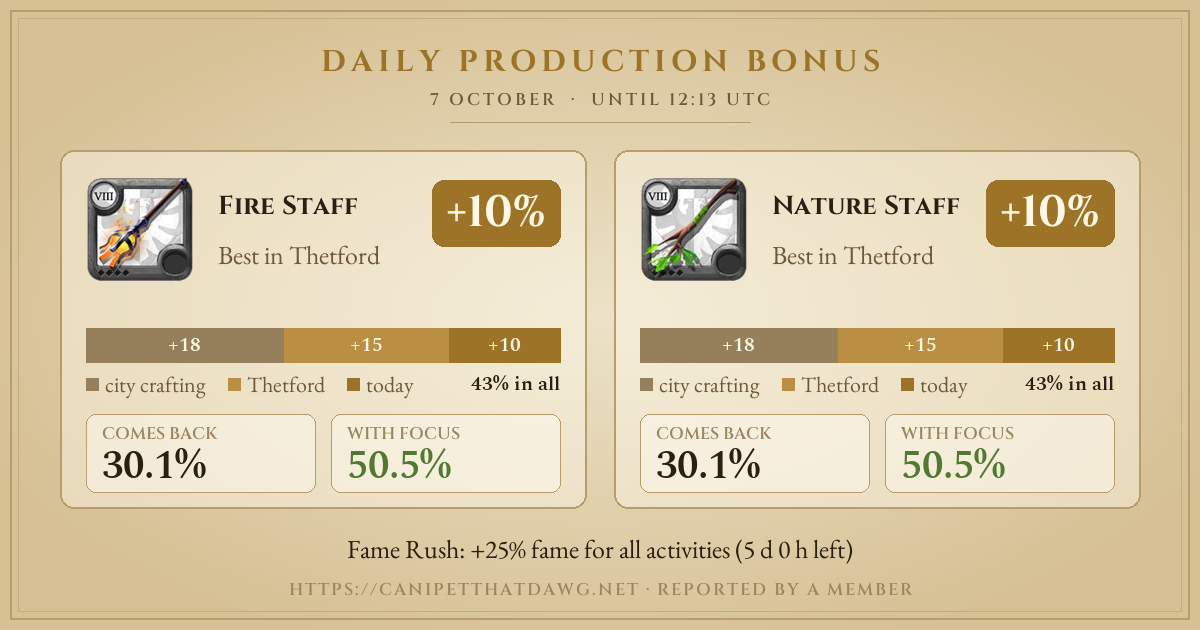
In the panel, Create #daily-craft-bonus makes a read-only channel for it, or pick one you have. Post Now posts today's again; Turn Off stops it.
Smaller things
- Time & Date: two read-only voice channels that always show the current UTC time and date, the same as game time.
- Audit Log: a digest of what happened in the server.
- Blocked Words: words the bots will never post for you. Add your own, one per line.
Good to know
- Only administrators and the Management role can open the control panel.
- Can't see
/majordomo? Reload Discord with Ctrl+R.