
Smuggler
Loot splits from the first screenshot to the payout. Smuggler keeps track of who is in a split, who has taken their loot, what everyone is owed, and who has earned the most over time.
Set it up, once
A server administrator runs /setup. Everything else needs the roles chosen there.
- Admin roles: who may manage any split. The server owner and anyone with Discord's Administrator permission always count.
- User roles: who may start splits and use the commands.
- Time limit: how long a split stays open. Type it the way you'd say it:
24h,12h 30m,55mor2d. - 🏗️ Create Channels makes a loot forum for each city you tick, and a channel for the weekly recap. You can run it again later to add a city.
Three switches in the same panel decide how splits end:
- ⏩ Push Through, on by default: after 30 minutes, a split's creator may accept a buyout for players who haven't answered.
- ✅ Auto-Close, off by default: a split closes and pays out as soon as the last screenshot is in.
- 📰 Weekly Recap: pick a channel, a day and an hour (UTC, the same as game time).
Run a split
- Type
/split, tag the players and give the loot's total value. Pick a forum and Smuggler starts a post there for you. - Each player takes their loot in the game and posts a screenshot in the split's post: an image, or a Gyazo, Imgur or Lightshot link. That marks them as done.
- An hour before the deadline, everyone still missing gets a last call.
- When all screenshots are in, the creator confirms, and everyone's share goes on the leaderboard.
Type amounts with their letter: 8.43m, 750k. A loot value under 10k is refused, and Smuggler asks what you meant.
The split's creator, or an admin, has ✏️ Edit Split: add or remove players, mark someone as submitted, give someone a different share (a late player 50%, the caller 150%), ping whoever is missing, extend the deadline, change the total, or close or cancel the split.
/loot shows your own open splits. /splits shows every open split in the server: who hasn't posted yet, and when each is due.
Buyouts
One player buys the whole loot tab at a discount and pays everyone else their share in silver. Press
🛒 Buy Out on a split, or start one with /buyout post.

- The discount is 5, 10, 15, 20 or 25%. Repairs come off first.
- Every player has to accept. One decline and it stays a normal split.
- Paid? Press ✅ I Got Paid. When everyone has, the split closes.
- A buyout is only possible until someone has taken their loot.
Only want the numbers? /buyout calc works out what to pay, and only you see the answer. Give it the loot value and
your discount, plus repairs if there were any. Fill in players when buying from more than one person.

/buyout calc answers for 25m at 10% off, 2.5m repairs, three players.The leaderboard
/leaderboard posts the top 15, the guild's share, the biggest splits and the week's top earners. A new one replaces the last
in the same channel, and each is taken down after 24 hours.
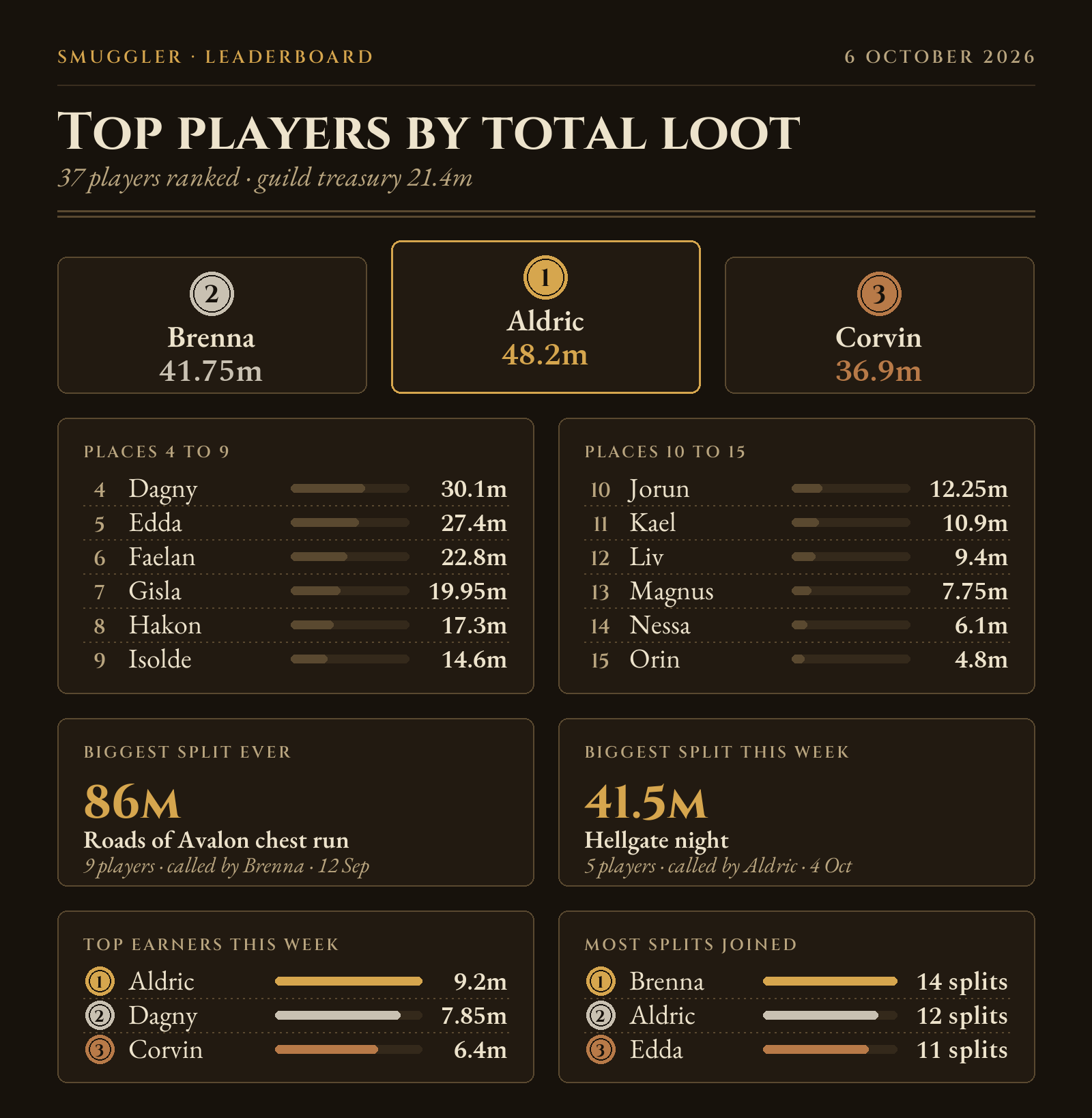
Under it, 📍 My Ranking shows your own place and 📜 Full Ranking lists everyone. Only you see what they show.
The weekly recap
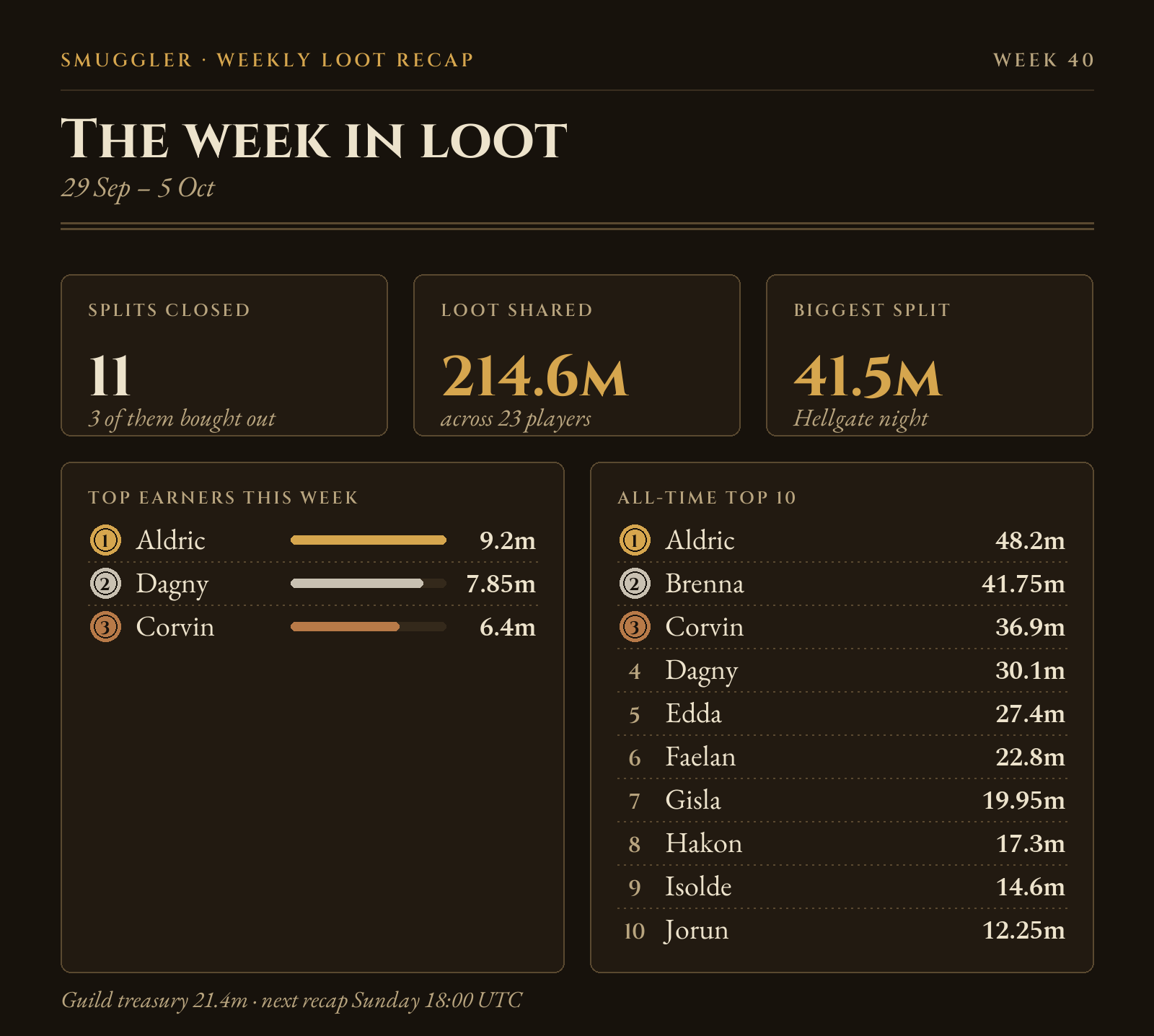
Once a week, in the channel you chose: the week's splits, the loot shared, the biggest split, the week's top earners and the all-time top 10.
For admins
/add_value,/remove_value,/reset_value: correct one player's total by hand./reset_all: reset every total in the server. It asks you to confirm.
Good to know
/helplists every command inside Discord.- Can't see a command? Reload Discord with Ctrl+R.
- Smuggler tidies up after itself: its offers, prompts and reminders go once they've done their job. The split, its picture and your screenshots stay.